August 2025 Newsletter
How to use Qualifier's AI capabilities
Curious about Qualifier's new Video Insights feature? It uses AI to tag ground-monitoring video, which can make it easier to search video footage from tests and streamline troubleshooting. We've put together a new video that walks you through the process of using Video Insights to help validate issues with a pedestrian emergency braking system. It also includes real-world footage of the Video Insights feature in action. If you'd like to see how it handles your video data, contact your Aptiv representative or email qualifier@aptivcs.com to set up a demo.

New Next-Gen Qualifier features
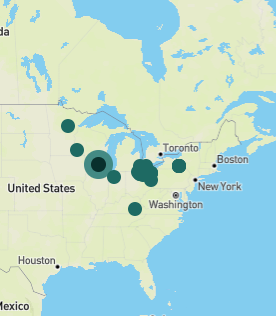
We've rolled out a lot more features for Next-Gen Qualifier over the summer, including the following:
- Maps on the Vehicles page
- Display customization on the Vehicles page
- Advanced Module Property Filter and other filters on the DTC Manager page
- Filter search on the home page
- Filtering for Support Desk tickets
- Support for MDF4, CSV, and ACS downloads for events and DTCs
You can always find the latest information about new features on the Release Notes page in the Qualifier Help Center.
Come see us at COMVEC 2025
Aptiv Connected Services will be at the SAE COMVEC event September 16-18 in Schaumburg, Illinois. If you'll be there, stop by booth 109 to meet with our Qualifier team and booth 208 to meet with our Movimento reflash team. We'd love to show you how our latest hardware, software, and services can help with your commercial vehicle validation needs. In addition, Aptiv's Kevin Price will be part of a panel discussion about Driving Forward with Data at 10:30 AM on Tuesday. Hope to see you there!

Advanced training sessions available
Hopefully you have already completed the Qualifier, AC-Graph, and DATALAB tutorials available through the Qualifier Help Center. (It not, what are you waiting for?) But your team might still only be scratching the surface of what's possible with Aptiv's powerful analytics tools. Our team has put together some advanced training on AC-Graph, Video Insights, and Next-Gen Qualifier. If you might be interested in virtual or in-person training, at your office or ours, please contact your Aptiv representative or email qualifier@aptivcs.com.
Pro tip: Right click video in AC-Graph
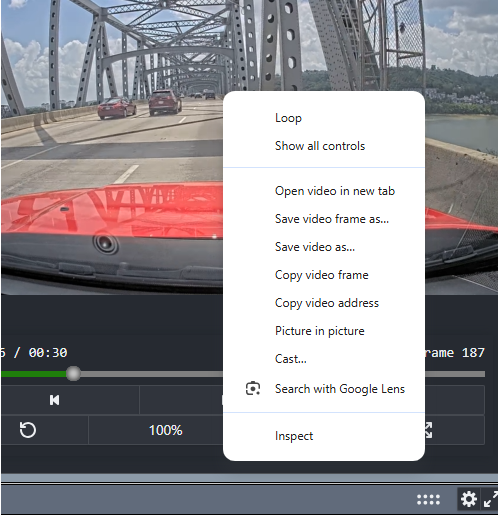
AC-Graph uses the Chrome browser's built-in video player. And you might not know it, but Chrome has a lot of built-in video tools that can be useful. If you right click in the AC-Graph video window (on the Media tab), you have the option to loop the video so it repeats over and over, download the video so you can view it offline, or even search the video with Google Lens to identify landmarks. Give it a try! Note: Because the Video Insights labels are not part of the original video, they are not supported with some of the Chrome tools.
Your Aptiv team is here to help
Questions? Contact your Aptiv representative or email qualifier@aptivcs.com.
Aptiv Connected Services
5725 Innovation Drive, Troy, MI 48908