December 2024 Newsletter
Happy holidays from Aptiv
As 2024 comes to a close, we'd like to thank you for being a Qualifier customer. We hope that you enjoy a festive and peaceful holiday season with your friends and family.
December 23 through January 1, Aptiv staff will be working reduced hours, but we will continue to have engineers available to help you should you need assistance. If you will be working remotely over the holidays, don't forget that you can set up notifications and report subscriptions to help you keep up with any testing. If you have questions or we can assist in any way, please reach out via the Aptiv Support Desk or email qualifier@aptivcs.com.
New feature: Expression Builder in AC-Graph
You probably already know that Qualifier supports calculated signals, also known as synthetics. This feature is useful when you need to do a unit conversion or calculate something like horsepower or fuel economy. Usually, people set up synthetics in their data collection before a test drive, but AC-Graph has a new Expression Builder that lets you set them up after a test drive, which can be helpful for troubleshooting. To learn more about how it works, check out the Expression Builder article in the Help Center.
Make sure you are using aptivcs.com URLs
If you are still accessing Qualifier via a URL that ends in http://control-tec.com , it's time to update your bookmarks. Replace http://control-tec.com with aptivcs.com in the URL that you use, keeping the rest of the address the same. For now, the old URL will redirect you to the new one, but in April, we plan to shut down the http://control-tec.com URLs

Visit Movimento at the Auto Show

January 10-20, 2025
If you're planning to attend the Detroit Auto Show in January, look for our reflash group, Movimento. We'll be part of the AutoMobili-D exhibits in the Huntington Place Ballroom during Industry Days, January 15-16. We'd love to chat with you about how Movimento Reflash services can help engineering teams become more productive and efficient.
Pro tip: Adjust the video settings in AC-Graph
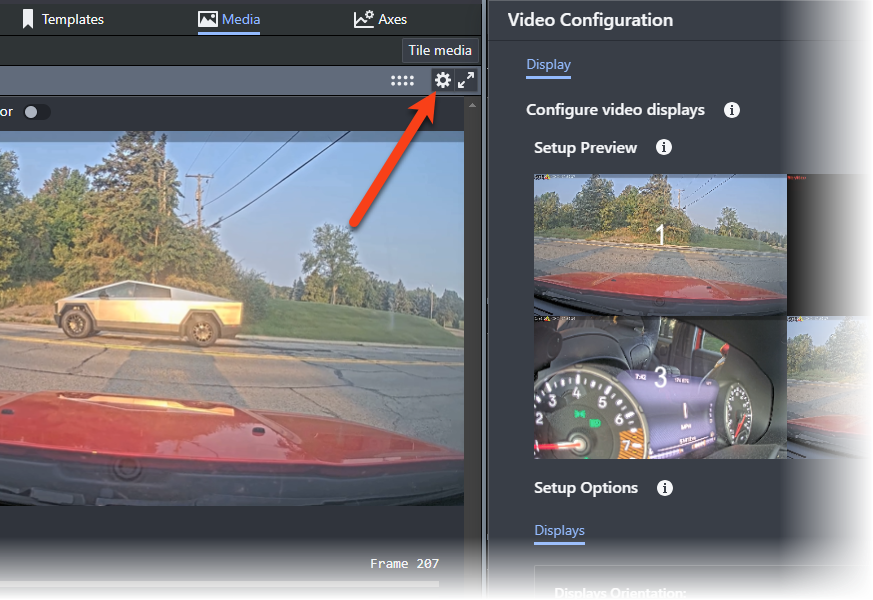
The latest update to AC-Graph gives you more control over your video playback. If your file has more than one camera, you can choose to make one, two, or four videos visible at once. And in case you accidentally installed one of the cameras upside down, you can also invert the video feeds. To see how it works, click the settings gear in the upper right corner of the video window.
Your Aptiv team is here to help
Questions? Contact your Aptiv representative or email qualifier@aptivcs.com.
Aptiv Connected Services
5725 Innovation Drive, Troy, MI 48908