January 2024 Newsletter
New and improved EV dashboard
Are you testing EVs? Our recently updated EV dashboard makes it easy to ensure that you have proper test coverage (including all charge levels) and to troubleshoot issues, especially those that span multiple vehicle models. To see it in action, ask your Aptiv representative for a demo or email sales@aptivcs.com.
Please complete the survey
If you haven't seen it already, you should soon see a very short survey asking how likely you are to recommend Qualifier to a friend. It takes less than a minute to complete, and we would really appreciate hearing your feedback. Thanks for helping us continue to improve Qualifier!
Will you be at the TMC conference?
Aptiv will have a booth at the American Trucking Association's TMC Annual Meeting March 4-7 in New Orleans. If you or other people from your organization will be there, we would love to meet with you. Email us at qualifier@aptivcs.com to set up a time or just stop by booth 4147. Hope to see you there!

Next-Gen Qualifier feature: Analytics search
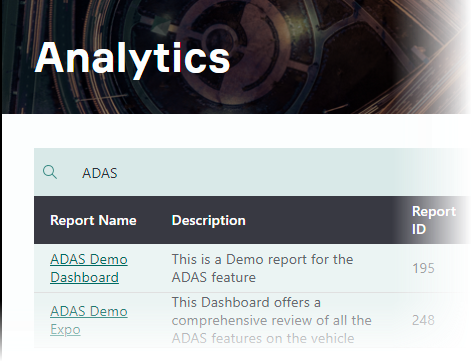
Does your team have a lot of different reports on the Analytics page? Next-Gen Qualifier has new omnisearch capabilities that make it easier to find what you're looking for. Type any keyword in the search box, and Qualifier will display matches, whether the word appears in the title, description, or another column. It's a great way to find a report when you remember what it was about, but don't remember the exact name.
Pro tip: Realign files in AC-Graph multifile mode
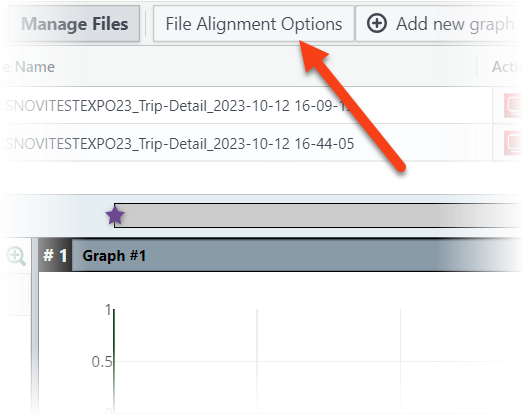
Before it opens multiple files, AC-Graph asks how you would like to align them (at the start of the files, on an event trigger, or concatenate). But sometimes you realize later that it would have been better to arrange them a different way. To change the alignment after the files are open, click the File Alignment Options button near the top of the window. This will open same panel you see when first opening AC-Graph, allowing you to change the alignment.
Your Aptiv team is here to help
Questions? Contact your Aptiv representative or email qualifier@aptivcs.com.
Aptiv Connected Services
5725 Innovation Drive, Troy, MI 48908