December 2023 Newsletter
Happy holidays from Aptiv
As one year comes to an end and another begins, we want to say thank you for being an Aptiv customer. We hope that the holiday season is safe and joyful for you and yours. And we're looking forward to continuing to work with you in 2024!
Designed for winter weather
As temperatures dip below freezing in some parts of the world, a few customers have asked about the temperature ratings on our VDRs. The EP-2000, EP-1000, and EP-600 can all operate in temperatures as low as -40 degrees (Celsius or Fahrenheit). And if you are troubleshooting issues that might be weather-related, you might want to ask your representative about video and Environmental Insights weather data integration.
Visit us at CES 2024
Aptiv will be attending next year's CES trade show, which takes place January 9-12 in Las Vegas. If you or someone else from your organization will also be at this event, we would love to give you a private tour of the Aptiv pavilion. To reserve your spot, register online today.

Automatic multifile mode in Next-Gen Qualifier
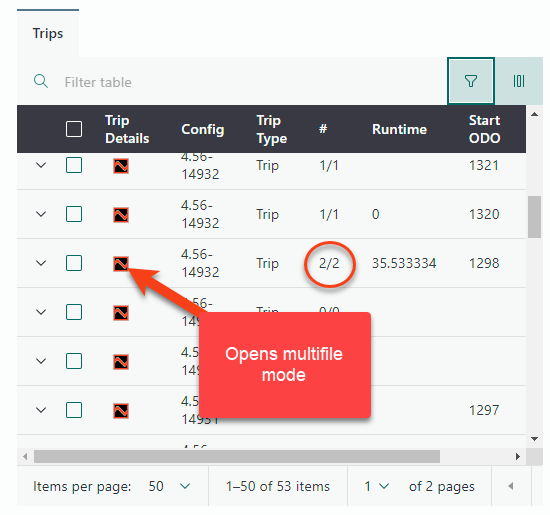
You probably already know that if a trip generates a large volume of data, Qualifier breaks that trip into multiple files to make it easier to process. But when you view a large trip in AC-Graph, you probably want to see the data from all those files at once. In Next-Gen Qualifier, clicking the AC-Graph link for a trip that includes multiple files will automatically launch multifile mode for all related trip files. Select Concatenate to view the entire trip from start to finish on a time-series graph.
Pro tip: Set your AC-Graph user preferences
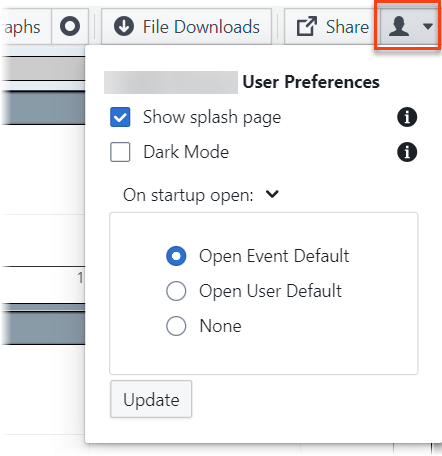
Clicking the person icon in the upper right corner of the AC-Graph window allows you to control what happens when you first open the application:
- Show splash page determines whether you see the parameter filter selection page.
- Dark mode turns the background black.
- On startup open allows you to open your default event or user template automatically (or not).
Important: When you are finished making changes, click Update to save your work.
Your Aptiv team is here to help
Questions? Contact your Aptiv representative or email qualifier@aptivcs.com.
Aptiv Connected Services
5725 Innovation Drive, Troy, MI 48908