October 2023 Newsletter
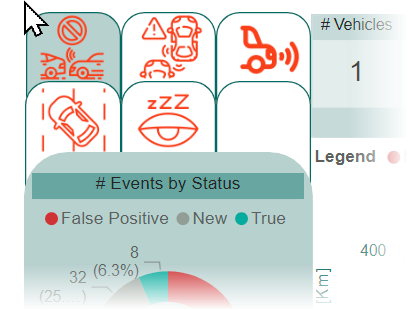
Demo the EV and ADAS dashboards
If you're validating new EV models or new ADAS features, Qualifier has some specially designed dashboards that can streamline the process. They allow you to see at a glance if you have adequate test coverage, and they speed up troubleshooting, particularly if an issue is occurring in several different vehicle models. To see these dashboards in action, contact your Aptiv representative or email qualifier@aptivcs.com.
We're at the Automotive Testing Expo

If we've already seen you at the Automotive Testing Expo in Novi this week, thanks for coming by. If you're in the Detroit area and haven't visited yet, you should! We are in booth 13000 near the front entrance, and we would love to chat with you in person. We're offering a sneak peek at Next-Gen Qualifier, plus Analytics and video demos. Tickets are free from the expo website.
Coming soon: omnisearch
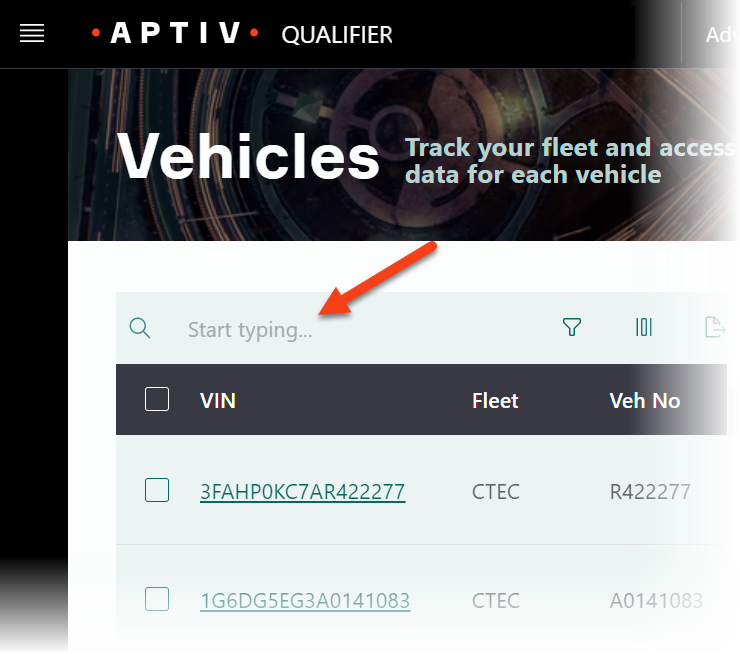
In November, we'll be rolling out a beta trial of the Next-Gen Qualifier interface. One of the most exciting new features is the omnisearch capability. Instead of setting filters at the top of the Vehicle page, you can just start typing in the omnisearch bar. Qualifier will automatically search across all columns, including VIN, fleet, vehicle number, and even comments. And if you prefer the old filters, you will be able to click the funnel icon to use those instead.
Look for a survey
Sometime in the next few weeks, you will see a short survey when you log in to Qualifier. It should take less than 2 minutes to complete, and we would really appreciate your feedback. Your opinions will help us continue to improve Qualifier. If you don't see the survey but have suggestions for improvement, use the Aptiv Support Desk or email qualifier@aptivcs.com to let us know.
Pro tip: Use global filters to improve performance
The easiest way to make the Qualifier web application faster is to set up some global filters. Filters limit the number of vehicles visible throughout Qualifier so that you are searching through less data. That makes everything faster. To use them, go to the Home page and click Edit Filters or click the Filters tab from anywhere within Qualifier.
If other people in your organization might want to use a filter you create, you can make it public. After you save a filter profile, select it from the from the drop-down and click Profile Access. To share it within your organization, click Make Public. You can stop sharing by clicking Make Private.
Your Aptiv team is here to help
Questions? Contact your Aptiv representative or email qualifier@aptivcs.com.
Aptiv Connected Services
5725 Innovation Drive, Troy, MI 48908