What is DATALAB?
DATALAB prepares recorded vehicle data for work outside Qualifier. It can combine files, retain only the parameters and records you need, and export the result in a standard analysis format.
A single unit of work in DATALAB is called an experiment. An experiment records three things:
- Which files you selected, and from which vehicles
- What you want done with them, such as merging them into one file
- How much of the data to keep, which you control with parameter, geographic, and conditional filters
Configure the experiment in a seven-step wizard, submit it for processing, and download the completed output from the DATALAB page.
When to use DATALAB
Use DATALAB when you need a prepared data file rather than an on-screen visualization. Common cases include:
- You want one continuous file covering several separate recordings, so you can analyze a whole test sequence at once.
- You want a bulk download of many files without opening each one.
- You have a large recording and only need a handful of parameters from it.
- You only want data recorded inside a particular geographic area, or only rows where a signal was above or below some value.
If you want to look at a signal on a chart, use AC-Graph instead. DATALAB produces files; AC-Graph produces plots.
What you can export
DATALAB can write your output as any combination of:
| Format | Description |
|---|---|
| CSV | Comma separated values |
| MAT | MATLAB data |
| MDF4 | Measurement data |
Getting there
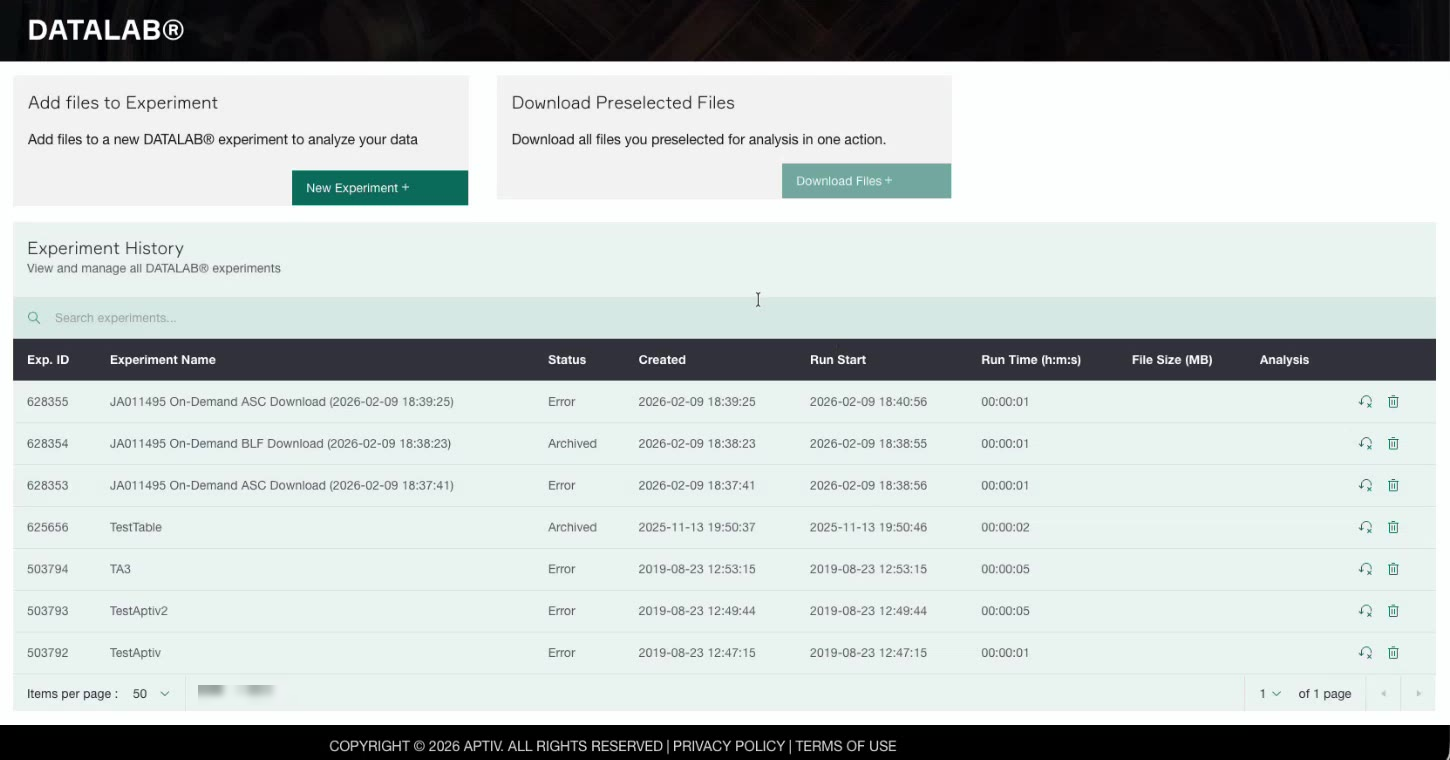
Open Analytic tools in the left navigation, then click DATALAB Results.
The DATALAB page has two entry points at the top:
- Add files to Experiment. Click New Experiment + to build an experiment from scratch. This walks you through the full wizard, starting with choosing vehicles.
- Download Preselected Files. Click Download Files + to download files you already preselected, in one action.
Below those, Experiment History lists every experiment you have created, with its status and a link to the results.
If you already know which vehicles, events, or diagnostic trouble codes (DTCs) you want, you do not have to start from the DATALAB page. You can select rows directly in the Vehicles, Events, or DTC grids and send them to an experiment, which skips the first steps of the wizard. See Start an experiment from a grid.
Experiments are private to you
An experiment belongs to the person who created it. Other people in your organization do not see your experiments, and you do not see theirs. There is no way to share an experiment with another user.
Experiments are archived automatically after a period of time. Once an experiment is archived, its results are no longer available to download, so retrieve any output you want to keep before that happens.