How Qualifier collects data
The data in Qualifier begins in the vehicle, but it does not all arrive in the same form. Understanding how it is collected, synchronized, and divided among file types makes the rest of the application much easier to read.
One synchronized stream
Aptiv vehicle data recorders (VDRs) collect across a wide range of protocols. Where it can, the technology reads broadcast controller area network (CAN) data to keep network traffic down. It can also reach high-speed CCP and XCP data, and legislative data, and connect to peripherals that collect thermocouple and analog readings.
These inputs feed a shared buffer. Each data type receives a Greenwich Mean Time time stamp, keeping otherwise different sources synchronized. Qualifier can therefore present a trip as one chronological timeline instead of a collection of unconnected logs.
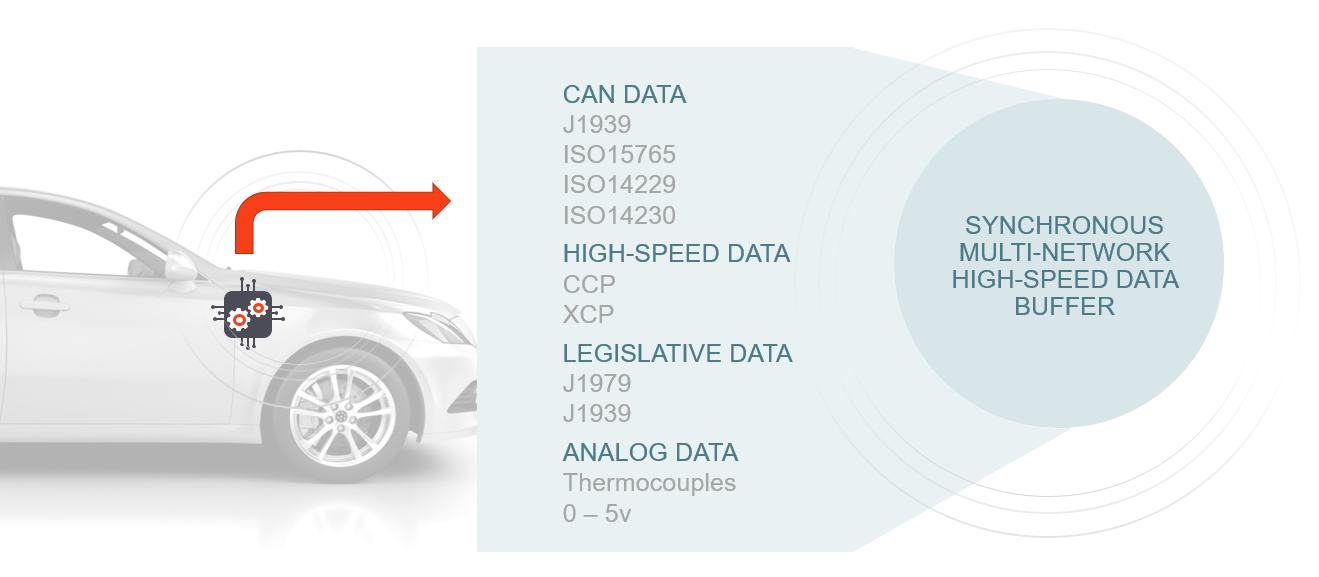
The synchronized data goes to the cloud, where Aptiv back-end systems convert it into the form the web application reads.
The five file types
| File type | What it holds |
|---|---|
| Trip file | A subset of parameters at 1 Hz for a whole trip, key on to key off. Good for how a signal moved across a drive cycle. Not detailed enough for close analysis, and it carries only some parameters |
| Event file | Also called a datalog. Triggered when a predefined condition occurs. Carries a much larger set of parameters, optionally the full CAN bus log, at microsecond precision, for a configured window before and after |
| Snapshot file | Sometimes called freeze-frame. A set of predefined parameters at a single instant. Built for statistical analysis and robustness work |
| Audio and video | Where the vehicle has cameras, video appears anywhere you see the video icon. Where a VDR is paired with an AC-Dash tablet, the driver can record audio after a manual trigger |
| CAN log file | The full CAN bus history, available for download from the VDR |
High-speed and low-speed datalogs
Event files come in two kinds.
High-speed datalogs collect broadcast CAN data plus requested ECU-specific module data. That is a lot of data, so they cover a short window, for example 30 seconds before a manual trigger and 10 seconds after.
Low-speed datalogs collect at 1 Hz for as long as a trigger condition holds. Use them when you want to find data around an event without needing fine detail, for example parameter values across a diesel particulate filter regeneration.
What a single trip produces
Taken together, a single drive cycle may generate hundreds of files covering thousands of parameters. Their GMT time stamps give Qualifier the common timeline needed to assemble them into a coherent view.
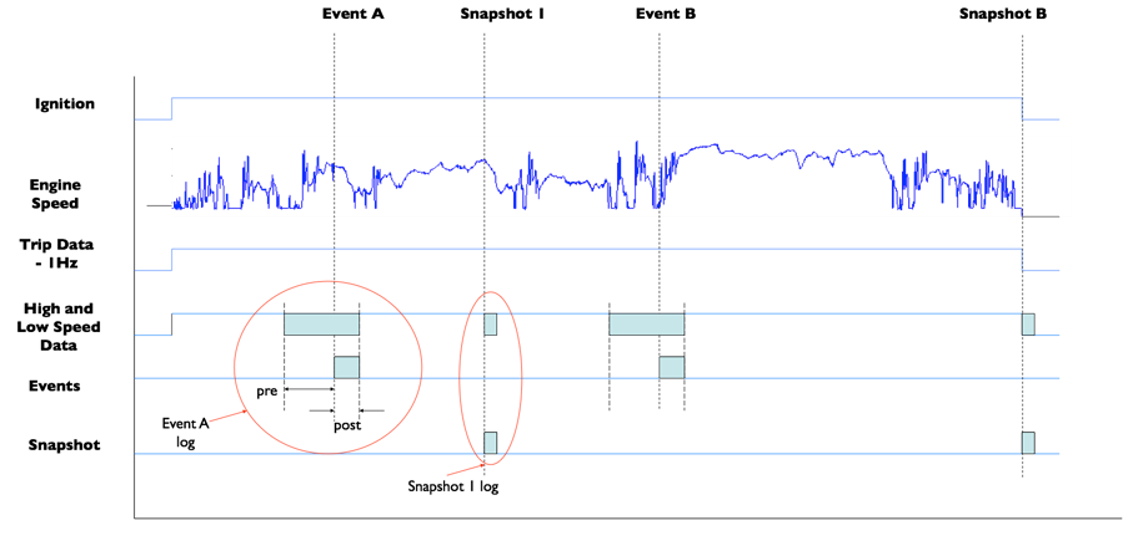
The trip above produced one trip file, two event files, and two snapshot files.
Triggers decide what gets recorded
A VDR creates an event or snapshot when its configured trigger conditions are met. Aptiv customer support engineers build that logic in Developer based on what your team needs to observe.
Triggers can be built on any network signal, can chain multiple operations, and support math and boolean operators, if/then/else, bitwise operators, timers, geofencing, and counters.
Triggers built for customers include cluster issues, lane assist, active grille shutters, climate control, ABS chime, alternator performance, traction control, battery state of charge, oil life, idle quality, start performance, DPF regen, transmission shift quality, engine hesitation, engine stop/start, fuel economy, CAN bus performance, and brake wear.
A worked example
Consider an engine calibrator who needs both detailed failure data and statistics covering every start.
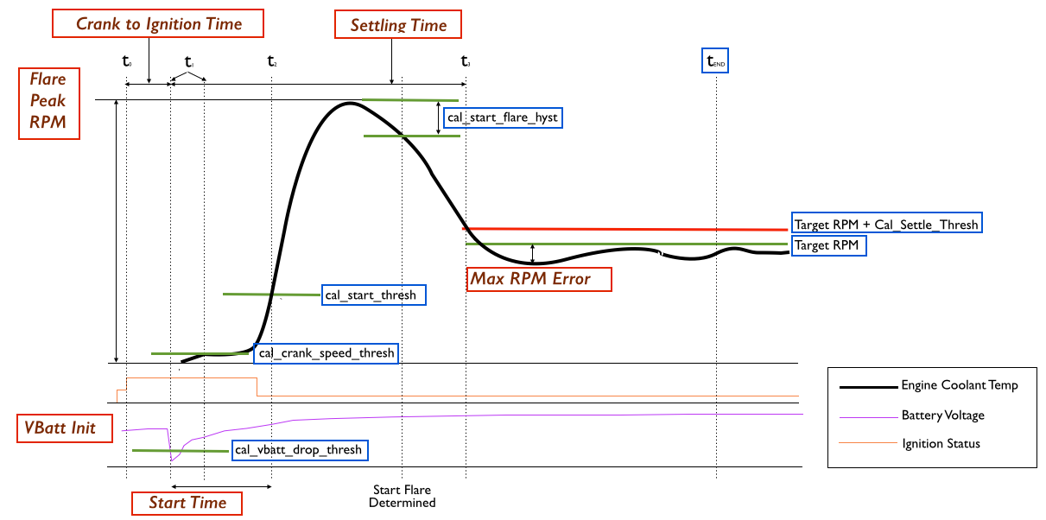
The red boxes are calculated parameters, also called synthetics. This customer had the VDR calculate crank-to-ignition time, settling time, maximum RPM error, and others. The blue boxes are the thresholds they did not want to exceed.
For troubleshooting, they needed to know when performance fell outside those thresholds. The VDR was configured to record a high-speed datalog covering 10 seconds either side of the event when any of these were true:
- Flare peak RPM above 1800
- Start time above the threshold for that start temperature
- Settling time above 5 seconds
- Minimum RPM more than 250 below target idle
They also wanted statistics across all engine starts, not just the bad ones. So the VDR was set to write a snapshot file on every start, capturing air, charge, coolant, and cylinder head temperatures; manifold, barometric, and supercharger pressure; start and settling time; and the maximum RPM flare with the minimum after it.
This pairing is common in custom data acquisition: capture failures in detail, then use lightweight snapshots to build context across every occurrence.