Create report thresholds
Report thresholds define the expected limits for a test result and supply the bounds used in its Cpk calculation.
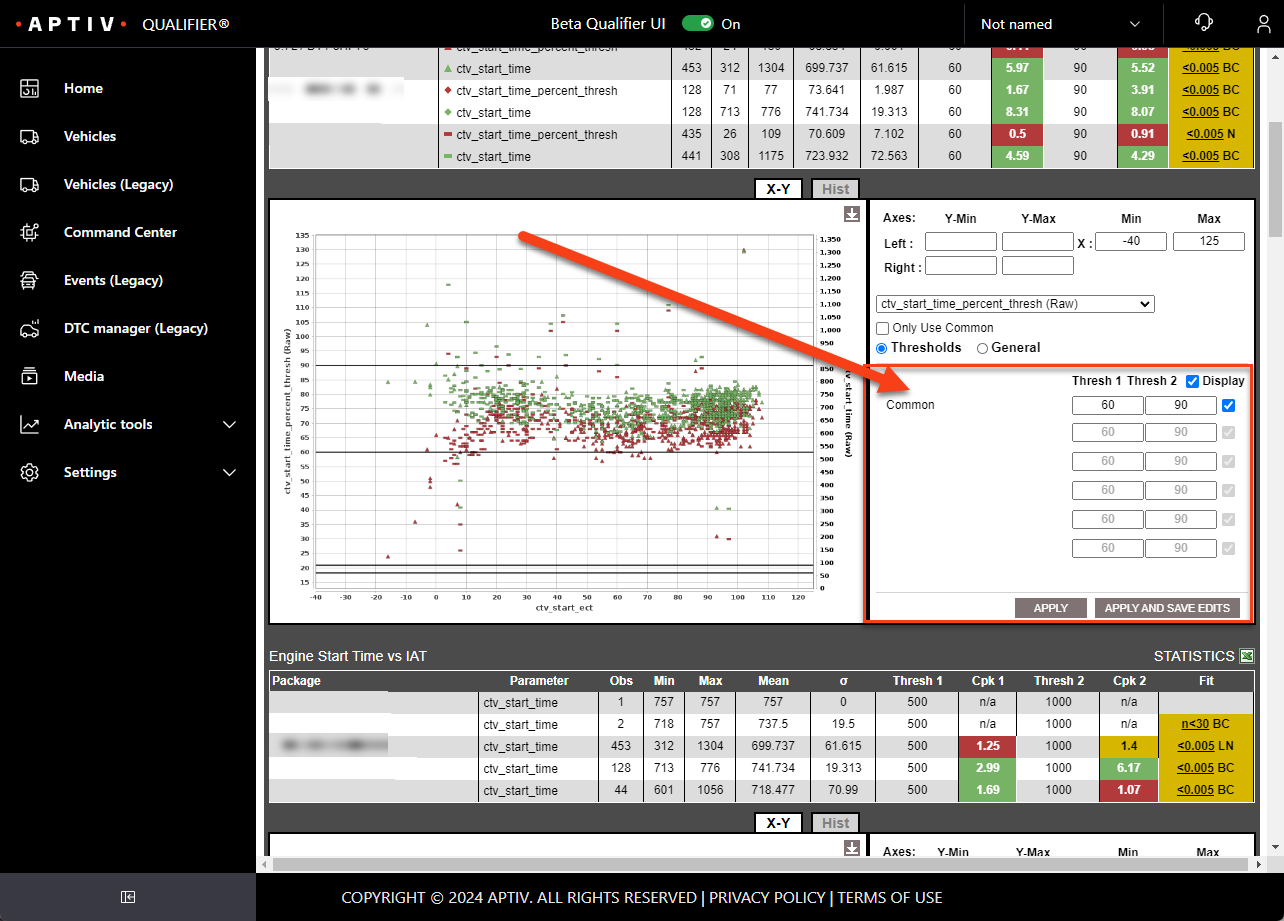
You set them from the chart controls after the report has run, not in the report configuration form.
- Run an Advanced Health Report. See Reports.
- Open the test results under the System Details section.
- Enter values in the Thresh 1 and Thresh 2 boxes.
- Click Apply to use the thresholds for this session only.
- Click Apply and Save Edits to keep them, so they apply every time anyone runs the report.
Saved thresholds affect everyone
Apply and Save Edits writes the threshold against that package and parameter combination for everyone who uses the report, not just you. Use Apply if you are only exploring.
Package-specific thresholds
A shared threshold may be too broad when packages have different expected ranges. Where a report contains snapshot data and you have grouped by package, vehicle, or calibration, each package can carry its own threshold.
See package-specific Cpk thresholds for the detail.